



This post covers how Odoo CRM works as a pre-sales engine, what its quotation and pipeline features actually do, and, critically, what gets unlocked the moment it is connected to inventory, finance, and supply chain.
Written for sales managers, ops heads, and business owners evaluating Odoo CRM or wanting to get more from it · You will come away with a clear-eyed picture of what Odoo CRM can and cannot do on its own, and what it becomes as part of a connected ERP.
Most businesses that implement Odoo CRM use about a third of what it is capable of. They set up a pipeline, log some leads, send a few quotes, and call it done. The system works, but the real value is still sitting on the table. Odoo CRM is genuinely powerful as a standalone pre-sales tool. What most people do not realise until they have lived with it for a while is that pre-sales is just where it starts.
When Odoo CRM is connected to inventory, accounting, manufacturing, and supply chain (which it is by default, because they share a single database), it stops being a place where sales reps log activity and becomes the operational trigger for your entire revenue cycle. That is not a feature. It is an architectural difference from every standalone CRM on the market. This post walks through exactly what that looks like in practice.
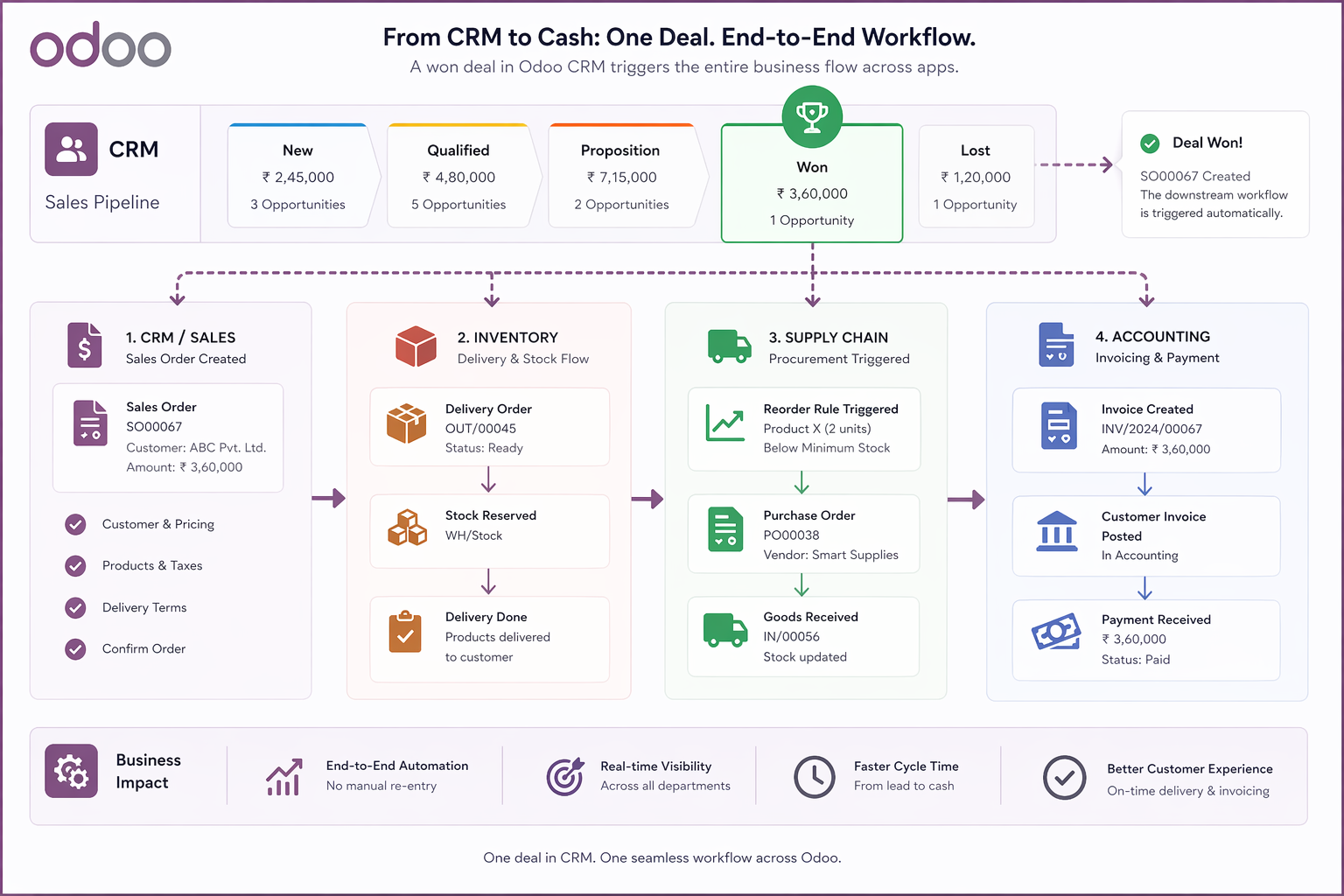
- →Odoo CRM covers the pre-sales journey, including lead capture, pipeline management, activity scheduling, and quotation, with a level of flexibility most standalone CRMs cannot match, including multiple funnels, fully branded quote templates, and product configurators.
- →Quotation templates in Odoo are fully customisable with branded layouts, cost sheet logic, optional products, pricing tiers, validity windows, and online signature. How you present your brand is entirely in your control.
- →When a deal is won, Odoo CRM does not hand off to another system. It triggers one. Inventory reservation, delivery order, draft invoice, and manufacturing demand can all be initiated automatically from a single confirmed sales order.
- →According to Tatvamasi Labs, most businesses that run Odoo CRM with fewer than three downstream modules connected are getting less than half the system's operational value, based on configuration reviews across 80+ projects since 2019.
Odoo CRM Is Pre-Sales. Its Value Does Not End There.
CRM, by definition, is a pre-sales function. It covers the journey from first contact to closed deal, covering lead capture, pipeline movement, qualification, quotation, and negotiation. Odoo CRM does all of this well, and it does it within the same platform that also runs your warehouse, your accounts, and your supply chain. That last part is what most CRM comparisons miss entirely.
A standalone CRM like Salesforce or HubSpot closes at the deal. The data it holds (customer, product, price, quantity, terms) then has to travel to another system to become an order, a delivery, and an invoice. That travel is where errors happen, where delays compound, and where sales and operations start blaming each other. In Odoo, there is no travel. The deal record and the operations record are the same record. What actually changes at the pre-sales stage in Odoo CRM is not the pipeline features themselves. It is what those features are connected to.
- ✓Stock availability is visible inside the quotation, so the sales team knows what can be promised before they send the quote
- ✓Customer credit status and payment history from Accounting are visible on the opportunity, so finance and sales have the same picture
- ✓Won opportunities do not need to be re-entered anywhere. Confirming the sales order begins the operational chain automatically
- ✓Revenue forecasting in the pipeline is based on real deal data, not manually updated spreadsheets, and it feeds directly into the financial view
This is the framing that matters. Odoo CRM is the front door of a connected operational system, not a standalone sales tool that happens to integrate with one. Most businesses only discover this difference after they have lived with both.
What Odoo CRM Actually Gives Your Sales Team (Before the Connection Matters)
Even before considering the ERP integration, the pre-sales capabilities of Odoo CRM are genuinely strong. The pipeline is Kanban by default. Opportunities drag between stages, colour-coded by priority, with the expected revenue and weighted forecast visible at each column. But the depth sits underneath that surface view.
Pipeline and funnel configuration
Odoo CRM supports multiple sales teams running separate pipelines within the same instance. A business with a new-business team and an account management team, or with distinct pipelines for different product lines or geographies, configures each independently. Stage names, probability weights, and activity sequences are all set per team. This is the "multiple funnel logic" that most businesses with any sales complexity need, and most standalone CRMs charge extra for at scale.
- →Stage names and descriptions configurable per sales team, not globally fixed
- →Probability per stage drives forecast accuracy. Weighted pipeline values update automatically as deals move
- →AI lead scoring ranks opportunities by predicted conversion likelihood based on historical win/loss data
- →Lost reason tracking with configurable reason codes. Pipeline reporting by loss reason is one of the most underused but most useful analytics features in Odoo CRM
Lead capture and activity management
Leads in Odoo CRM can be created automatically from the website contact form, live chat, email to a configured alias, WhatsApp (with integration), event registrations, and support tickets. Every source lands in the same pipeline, tagged with its origin. The activity system (calls, meetings, emails, to-dos) sits on every opportunity record and feeds the salesperson's daily task queue. Nothing falls through because the system holds the next action for every deal.
- ✓Automated lead creation from website, live chat, email aliases, and events
- ✓All email communication with the prospect logged automatically in the chatter, with no manual note-taking
- ✓Meeting scheduling syncs with Google Calendar or Outlook. Appointments are booked from within the opportunity record
- ✓VoIP call logging with automatic next-action rescheduling. The system proposes a follow-up call the moment one ends
The Quotation Is Where Your Brand Speaks and Odoo Lets You Control That
A quotation is not a price list. It is a commercial document that represents how your business presents itself to a customer at the most critical moment in the sales cycle. The layout, the language, the product grouping, the cost logic all signal professionalism or the lack of it. Odoo's quotation system is built with this in mind, and it is considerably more configurable than most businesses realise when they first set it up.
Quotation templates: designed for your sales process, not a generic one
Odoo quotation templates let you predefine the structure of a quote for a specific product type, service tier, or customer segment. A sales rep selects the template, the standard line items load, and they personalise from there. This is not just a time-saving feature. It is a consistency control. Every quote that goes out for the same product category looks the same, uses the same terms, and includes the same supporting information.
-
→
Branded layouts Company logo, colour scheme, header and footer content. The PDF output is your document, not a generic Odoo template. QWeb reporting allows complete layout control for businesses that need custom quotation designs.
-
→
Optional products and upsell logic Add optional line items that appear as choices for the customer in the online quote view. A solar installer can quote the base system and let the customer add battery storage, monitoring, or an extended warranty directly on the quote. The sales rep does not need to re-quote. The customer self-selects.
-
→
Pricelist and cost configuration Pricelists in Odoo can be customer-specific, volume-based, time-limited, or currency-specific. The system applies the correct pricelist automatically when the customer is selected, with no manual price lookup and no version confusion. For businesses that need a cost sheet with margin visibility behind the scenes and a clean customer price on the face, this is configurable natively.
-
→
Online signature and payment The customer receives a link to the quote in an online portal. They review it, add optional items if available, and confirm with an electronic signature or advance payment. No printing and no PDF email chains. The confirmed quote converts to a sales order immediately.
-
→
Product configurator For products with variants such as size, colour, or specification, the product configurator presents the selection matrix directly in the quotation. No attribute lookup needed. The sales rep selects the configuration and the correct variant, price, and lead time populate automatically.
💡 Pro tip: Quotation templates are where Odoo CRM customisation delivers the fastest ROI. Businesses that invest one day in designing templates for their two or three most common sales scenarios eliminate 80% of quote preparation time and eliminate the inconsistency that makes proposals look ad-hoc. If you want Odoo to reflect your brand at the quotation stage, see our Odoo customisation capabilities for layout-level changes beyond the default template builder.
What Happens the Moment a Deal Is Won and Why the Connection Changes Everything
This is the moment that separates Odoo CRM from every standalone CRM on the market. When a deal is marked as won and the quotation is confirmed as a sales order, nothing is handed off to another system. The record is already in the ERP. The downstream workflow begins automatically.
Here is what a confirmed sales order triggers in a typical Odoo configuration.
-
01
Inventory reservation. Stock is checked and reserved against the confirmed quantities. If stock is sufficient, a delivery order is created in the warehouse module immediately. If not, Odoo flags the shortfall and can trigger a replenishment or purchase order automatically, depending on the product's reorder rules.
-
02
Delivery order creation. A picking order appears in the warehouse module with the exact products, quantities, and delivery address from the sales order. The warehouse team sees it immediately, with no phone call, no email, and no copy-paste from the CRM into a delivery sheet.
-
03
Manufacturing demand (if applicable). If the product is manufactured rather than stocked, the confirmed sales order feeds into MRP as a demand signal. A manufacturing order can be created automatically or via the MRP planner, with the bill of materials and routing already defined. No separate production brief is required.
-
04
Draft invoice in Accounting. Depending on the invoicing policy (on order, on delivery, or on milestones), Odoo generates a draft invoice at the appropriate trigger. All pricing, terms, and customer data carry over exactly from the sales order. The finance team confirms and sends it. No re-entry, no pricing errors, no terms disputes.
-
05
Customer portal update. The customer can log into their portal and see the sales order, track their delivery status in real time, and view and pay invoices, all without contacting your team. The relationship continues after the sale inside the same system that closed it.
"In a standalone CRM, winning a deal ends the CRM's job. In Odoo, winning a deal is when the ERP's job begins, and it begins automatically."
Tatvamasi Labs, from Odoo CRM implementation experience
The Downstream Modules Odoo CRM Unlocks
The Odoo CRM module sits at the top of a connected stack. Each module it touches adds a layer of operational visibility or automation that a disconnected CRM simply cannot provide. Here is how those connections work in practice, and why they matter beyond just convenience.
CRM + Inventory / SCM
- ✓Real-time stock levels visible at the quotation stage
- ✓Won order triggers delivery and replenishment automatically
- ✓Customer delivery tracking visible in the customer portal
- ✓No overselling. Availability logic is built into the quotation
CRM + Accounting / Finance
- ✓Customer credit and payment history visible on opportunity
- ✓Invoice generated from sales order with zero re-entry
- ✓Revenue forecast in CRM feeds financial planning view
- ✓Margin visibility per deal if cost price is configured
CRM + Marketing Automation
- ✓Campaign performance tied to actual pipeline revenue, not just clicks
- ✓Lead nurturing sequences triggered by CRM stage movement
- ✓Email marketing audience built directly from CRM segments
- ✓No contact list import or export. The same database is used throughout
CRM + Project / Helpdesk
- ✓Won deal auto-creates a project with client and scope pre-populated
- ✓Timesheet hours log against the customer record for billing
- ✓Support tickets link back to the original customer and sales history
- ✓Upsell opportunities visible from support ticket context
The marketing-to-CRM connection deserves specific emphasis. In a disconnected stack, marketing knows how many clicks a campaign generated. Sales knows how many deals closed. The gap between the two (which campaigns produced revenue, not just leads) is almost never answered without a manual reconciliation exercise. In Odoo, both live in the same system. The revenue attribution from a campaign to a closed deal is native data, not an analytics project.
⚠️ Watch out: The most common misconfiguration we see in Odoo CRM is when businesses set up the pipeline and quotation features carefully but leave the downstream module connections on default. This means inventory checks are not enabled on quotations, and invoicing policy is not aligned with their billing terms. The system works, but the integration value disappears. Getting the connection logic right is a configuration decision that should be made deliberately, not left to defaults. Our customisation vs configuration guide explains where these choices sit.
If your business is already live on Odoo CRM but not seeing this operational connection in practice, the issue is almost always configuration depth rather than missing capability. The features are there. They need to be switched on and mapped to your workflow. That is exactly what a focused Odoo support audit surfaces, showing the gap between what your Odoo installation can do and what it is currently doing for your revenue cycle. You can also explore our overview of Odoo integrations for cases where connections beyond the native module set are needed.
Want your Odoo CRM to actually drive operations and not just log leads?
We configure Odoo CRM pipelines, quotation templates, and downstream module connections for SMEs across manufacturing, distribution, and services.
Frequently Asked Questions
Prefer a quick chat? WhatsApp our team and we will respond within the hour.
💬 Chat on WhatsApp
