



This post explains what Odoo Runbot does, how to read it, and when it should influence a business decision, without requiring a development background.
Written for business owners, project managers, and operations leads involved in an Odoo implementation or upgrade. You will come away with a clear picture of what Odoo Runbot is, what it is not, and the right questions to ask your implementation partner.
At some point during an Odoo implementation or upgrade conversation, your technical team or partner will mention Odoo Runbot. It usually comes up in the context of version stability. You might hear something like "the 19.0 branch is green on runbot" or "we're waiting for runbot to clear before we proceed." If you are not a developer, that sentence tells you almost nothing useful, even though the information behind it directly affects your project timeline.
This post translates runbot into plain language. You will not need to use it yourself, but understanding what it does puts you in a better position to hold your implementation partner accountable and ask the right questions before an upgrade or go-live decision.
- →Odoo Runbot is Odoo's official automated testing platform at runbot.odoo.com. It builds and tests every code change Odoo's developers push, and displays results publicly.
- →Green means all automated tests passed. Red means a test failed. Yellow means the build is in progress. None of these statuses tell you whether the version is right for your specific business.
- →Runbot tests Odoo's core code only, not your customisations, third-party modules, or business-specific configurations.
- →A certified partner monitors runbot as part of upgrade planning. Your job is to know what questions to ask, not to interpret the dashboard yourself.
What Is Odoo Runbot?
Odoo Runbot is the official continuous integration (CI) platform maintained by Odoo S.A., publicly accessible at runbot.odoo.com. Every time a developer pushes code to any branch of Odoo's repository, Runbot automatically builds a live instance of that branch and runs thousands of automated tests. The results (pass, fail, or in-progress) are displayed on a public dashboard.
Think of it as a continuous health monitor for Odoo's codebase. A few analogies that make it concrete.
-
→
Like a quality control line in manufacturing. Every product (code commit) that comes off the production floor (developer's machine) goes through an automated inspection before it can be released.
-
→
Like a traffic light for code stability. Green means safe to proceed. Red means something broke. Yellow means still checking.
-
→
Like a public audit trail. Anyone, including your implementation partner, can see the current state of any Odoo version branch, at any point in time.
Why Runbot Exists and Why It Matters to Your Business
Odoo releases a new major version roughly every year. Between major releases, Odoo's developers continuously push bug fixes, security patches, and feature updates to the active branches. Without a system like runbot, there would be no reliable way to know whether any given day's codebase is stable enough to build on.
Here is why this matters to a business owner or project manager
- →If your partner schedules an upgrade or go-live when a relevant Odoo branch is red on runbot, you are building on an unstable base.
- →If you are evaluating whether to upgrade from Odoo 18 to 19, runbot tells your partner whether the 19.0 branch is currently stable enough to base that migration on.
- →If a critical bug fix was pushed to your current version, runbot confirms whether that fix passed testing before your partner deploys it to your instance.
Runbot does not replace your partner's judgment. It is one data point among several. But it is a data point that a competent odoo implementation partner should be checking as a matter of routine.
What You Actually See on the Runbot Dashboard
The runbot dashboard at runbot.odoo.com is public. You can open it right now. Here is what each element means in plain language.
← Scroll to see all columns →
| What You See | What It Means | Business Relevance |
|---|---|---|
| Branches (e.g. 19.0, 18.0) | Different versions of Odoo under active development or maintenance | Your current or target Odoo version will appear as one of these branches |
| Commits | Individual code changes pushed by Odoo developers. Each one triggers a new build | Your partner can trace a specific bug fix to a specific commit and confirm it passed testing |
| Build status icons | Coloured indicators showing pass, fail, or in-progress for each commit | The core signal your partner uses to assess version stability |
| Live preview links | Each green build generates a live Odoo instance you can log in to and explore | Useful for previewing a new version's interface before committing to an upgrade |
| Module-level test results | Breakdown of which specific Odoo modules passed or failed in the build | Helps identify if a failure is in a module your business relies on, e.g. Inventory, Accounting |
What the Build Colours Mean
The colour-coded build statuses are the single most referenced element on runbot. Here is what each one means, and equally important, what it does not mean.
-
GREEN
All automated tests passed. The core Odoo codebase at this commit has no known regressions in Odoo's own test suite. A prerequisite for any upgrade or go-live, not a guarantee of stability in your specific environment.
-
RED
One or more tests failed. A code change introduced a regression. Something that was working before now fails. A responsible partner will not base an upgrade on a red build and should be monitoring for when it turns green.
-
YELLOW
Build in progress. The automated test run is still executing. No conclusion can be drawn yet. Builds typically take between 30 minutes and a few hours depending on the scope of changes.
-
GREY
Build skipped or killed. The build was cancelled, usually because a newer commit superseded it before testing completed. Common on actively developed branches where multiple commits are pushed in quick succession.
⚠️ Important context — A green build on runbot only confirms that Odoo's own test suite passed. It says nothing about your customisations, your third-party modules, or whether a new version will behave correctly in your specific business environment. That validation requires a dedicated staging environment, which is your partner's responsibility, not runbot's.
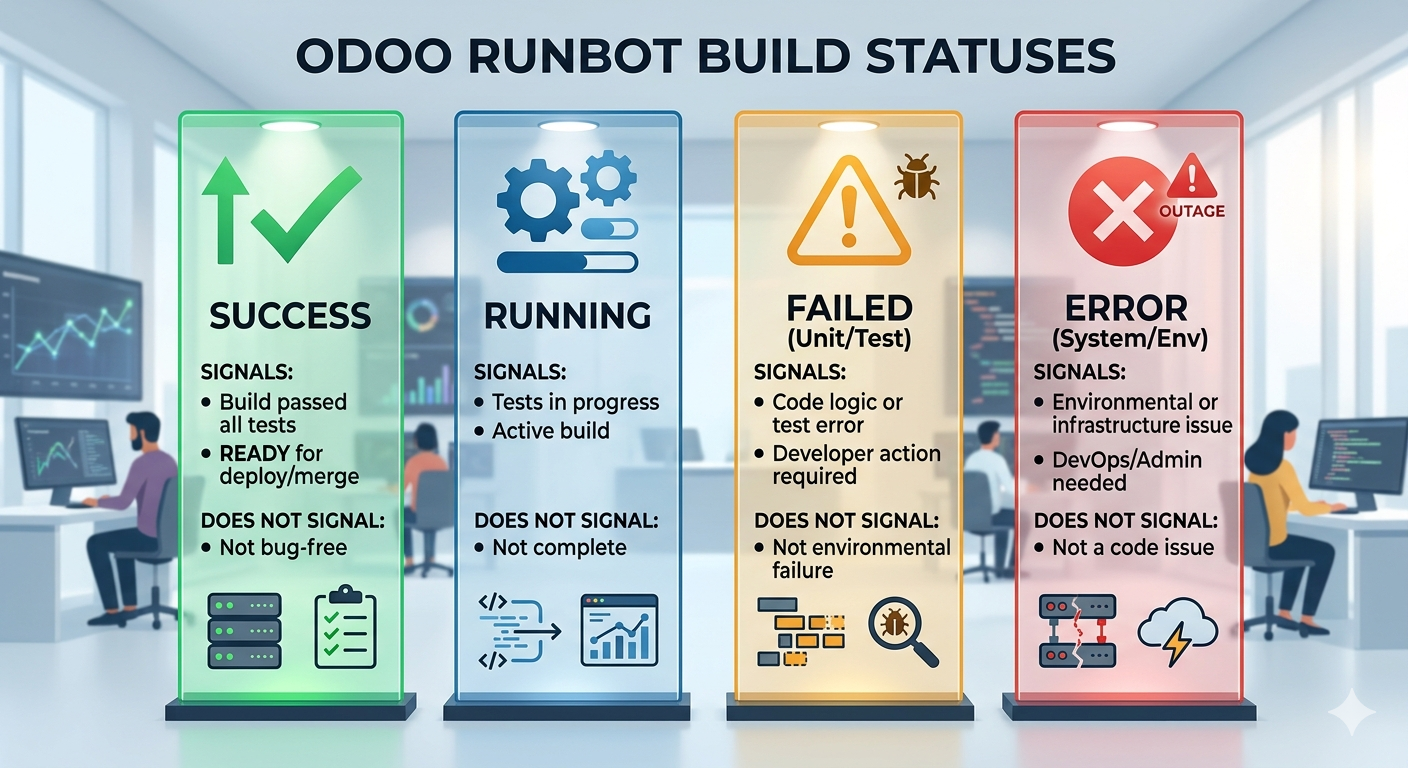
Odoo Runbot build statuses: what each colour signals and what it does not
How Partners Use Odoo Runbot During Implementation and Upgrades
A certified Odoo partner uses runbot as a reference point at several stages of a project. The two scenarios most relevant to growing businesses are a new Odoo implementation and a version upgrade(migration). Here is what that looks like in practice for each.
During a new implementation
- →Partner selects the most recent stable commit on the target branch as the base for your instance.
- →If a critical bug fix is released mid-implementation, partner checks runbot before applying it to confirm the fix itself did not introduce new failures.
- →Module-level test results on runbot help isolate whether a behaviour issue is in the core or in a customisation.
- →Partner can share a live runbot preview link for you to explore a module's default behaviour before the configured version is ready for UAT.
During a version upgrade
- →Partner monitors the target version branch on runbot for a sustained green run, typically 2 to 4 weeks of stable builds, before recommending the upgrade date.
- →Module-specific failures on runbot (e.g. the Accounting or Manufacturing module is red) may signal that the upgrade should wait, particularly if your business relies heavily on that module.
- →Partner uses runbot preview instances to map UI and workflow changes in the new version before migration, reducing surprises during UAT.
- →Runbot commit history is used to trace when a known bug was introduced and whether the fix has already been merged into the target version.
Common Misconceptions About What Runbot Does Not Do
Runbot is frequently misunderstood. Sometimes by business owners who over-rely on a green build as a go-ahead signal, and occasionally by less experienced partners who treat it as a substitute for proper staging. These are the misconceptions worth clearing up.
-
✗
Runbot does not test your customisations. Only Odoo's official codebase runs on runbot. Any module built by your partner, any third-party app from the Odoo App Store, and any API integration you have in place is invisible to runbot's test suite.
-
✗
Runbot is not a staging environment. Runbot instances run on demo data and a clean Odoo install. They have no knowledge of your business data, workflows, or configuration. A staging environment that mirrors your production instance is a separate, partner-managed responsibility.
-
✗
A green build is not a go-live clearance. Green means Odoo's own tests passed. It says nothing about performance under your transaction volumes, compatibility with your custom modules, or whether your team's workflows are correctly configured.
-
✗
Runbot does not indicate whether a version is officially released. Active development branches like 19.0 may be green on runbot long before Odoo S.A. officially releases that version for production use. Green on runbot does not mean production-ready.
-
✗
Runbot is not a support tool. If your live Odoo instance has a bug, you cannot use runbot to fix it. Runbot is a diagnostic reference. Resolution still requires your partner or an AMC-covered support engagement.
When Should a Business Owner Pay Attention to Runbot?
You do not need to use runbot directly. But there are specific moments in a project lifecycle where knowing what it is, and asking your partner the right question about it, protects your interests.
Ask your partner about runbot status in these situations
- →A go-live date has been proposed. Ask whether the target version branch is currently green and stable.
- →A version upgrade has been recommended. Ask how long the target branch has been consistently green and whether any modules you rely on had recent failures.
- →A bug on your live instance has been raised. Ask whether the fix has already been merged and passed runbot testing, and when your partner will apply it.
- →Your partner is slow to progress an upgrade. Runbot status can be a legitimate blocker or a delay justification. Ask your partner for clarity on which applies.
Questions worth asking your partner directly
- →"What is the current build status of the version we are targeting?"
- →"Are any of the modules we use currently red or unstable on runbot?"
- →"Has the bug fix for the issue we reported been merged and passed testing on runbot?"
- →"Are you using a runbot-verified commit as the base for our instance, or a custom build?"
If your partner cannot answer these questions clearly, that is worth noting. A certified partner operating an Odoo consultation or implementation should have runbot monitoring built into their standard workflow. It is not an advanced capability but a baseline practice.
For a broader look at the questions worth asking before and after go-live, our post on Odoo ERP support audits covers the full accountability framework for live instances.
Unsure whether your Odoo instance is on a stable, well-maintained base?
Talk to a certified partner who monitors runbot as a standard practice and can assess your current setup in a single session.
Frequently Asked Questions
Prefer a quick chat? WhatsApp our team. We respond within the hour.
💬 Chat on WhatsApp
