



This post covers how Odoo ERP maps to specific industries such as manufacturing, distribution, eCommerce, services, and field operations, plus what actually determines whether an implementation succeeds.
Written for business owners and ops leads evaluating Odoo ERP for their industry. You will get a module-level breakdown by business type, plus the three decisions that define implementation outcomes.
The most common question we hear before an engagement is often phrased like this. "We are a manufacturer, a distributor, or a service company. Is Odoo actually built for us?" The honest answer is yes, but not always for the reason people expect. Odoo ERP is not a single product with a fixed feature set. It is a platform of over 80 official modules that different businesses assemble differently. A textile manufacturer and a management consultancy both run on Odoo, yet they use almost entirely different module combinations.
The real evaluation question is not "is Odoo ERP the right platform?" For most SMEs, it is. The question is "what does the right Odoo configuration look like for our specific operations, and do we have the right partner and internal readiness to get there?" This post answers both.
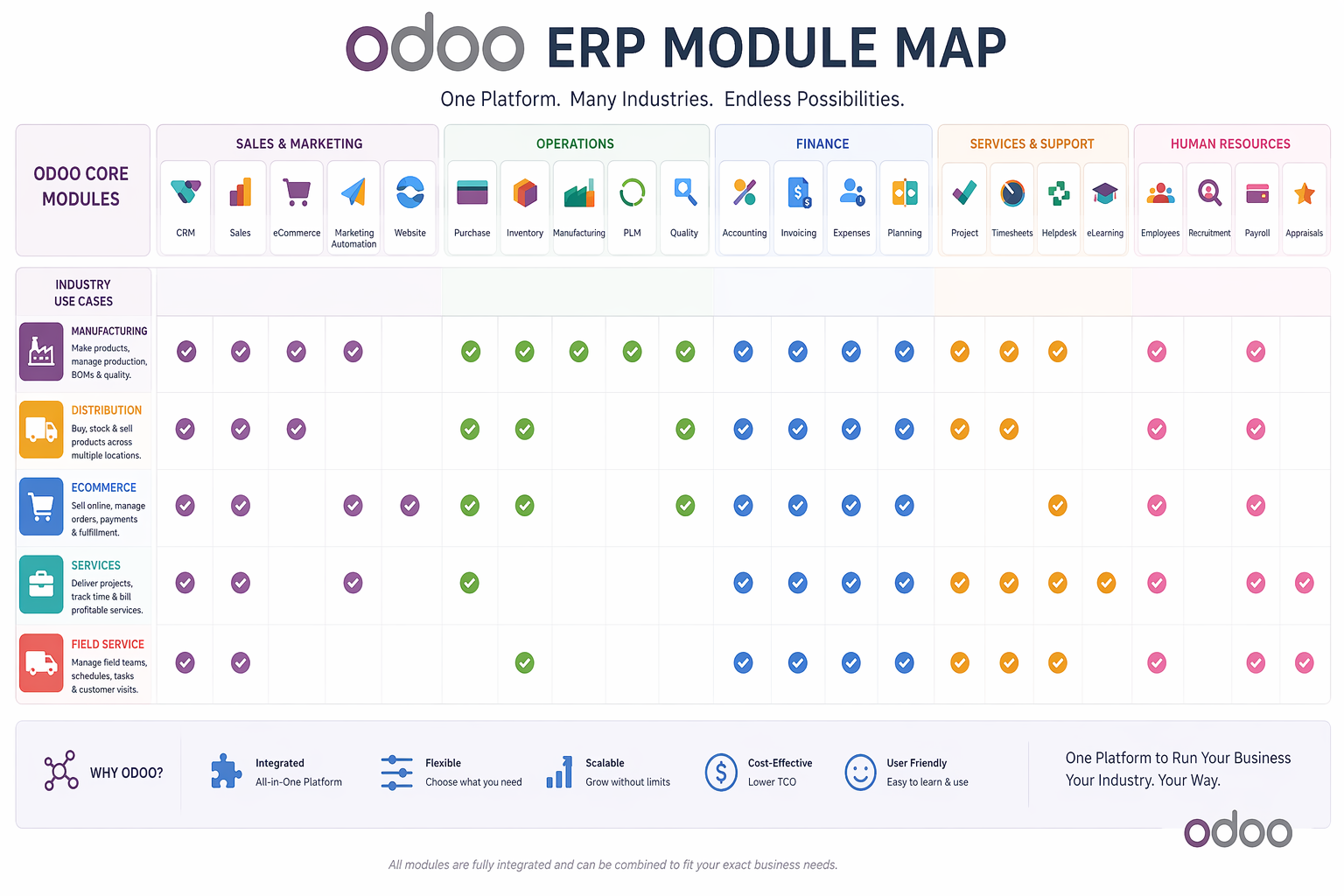
- →Odoo ERP covers marketing, sales, operations, manufacturing, finance, and HR in a single platform, making it viable for product companies and service businesses alike.
- →Based on Tatvamasi Labs' experience across 80+ projects in textile, solar, distribution, eCommerce, and field service, the module starting point differs by industry, but the foundation modules of Accounting, CRM, and Sales are almost always the same regardless of sector.
- →Odoo scales from a startup using just the website and CRM modules to an enterprise running multi company operations across currencies and geographies. It is the same platform, progressively activated.
- →The platform is rarely the bottleneck. Partner quality, requirements clarity, and team adoption readiness are the three variables that separate successful implementations from troubled ones.
Odoo ERP Is Not One Product. It Is Every Product Your Business Needs, Modularly
Most ERP vendors sell you a version of their product (an industry edition, a tier, a bundle) and you adapt to it. Odoo inverts this. The platform is a shared framework, and the product your business uses is the combination of modules you activate. A retailer activates eCommerce, POS, and Inventory. A manufacturer activates MRP, Work Orders, Quality, and Maintenance. A consultancy activates Project, Timesheet, CRM, and Accounting. The underlying database, reporting engine, and access controls are the same, while the operational surface changes entirely.
This architecture has a direct business consequence. You are not paying for features you will never use. Most enterprise ERP platforms charge a licence that bundles functionality whether your business needs it or not. Odoo's modular pricing means your starting configuration is lean by design. The full span of what Odoo ERP covers is wide, spanning three core areas.
Front Office
- ✓CRM and Sales
- ✓Website and eCommerce
- ✓Email and Social Marketing
- ✓Live Chat and Helpdesk
- ✓Events and Appointments
Operations
- ✓Inventory and Warehouse
- ✓Manufacturing and MRP
- ✓Purchase and Procurement
- ✓Quality Control
- ✓Field Service and Maintenance
Back Office
- ✓Accounting and Finance
- ✓HR and Payroll
- ✓Project and Timesheets
- ✓Documents and Sign
- ✓Analytics and Reporting
The important point is that all of these live in the same database. A lead that comes in through the website becomes a CRM opportunity, then a Sales quotation, then a confirmed order that triggers inventory movement, then an invoice in Accounting. That chain happens without a single data export, API call, or manual handoff, because it is all one system. That is what most businesses are actually buying when they choose Odoo ERP, whether they realise it going in or not.
The Foundation Layer Every Industry Shares
Regardless of sector, almost every Odoo ERP implementation we scope starts with the same three to four modules. These form the operational backbone before any industry-specific layer is added. Getting these right is the prerequisite for everything else.
-
→
Accounting The financial ledger is always first. Every transaction in every other module, including sales orders, purchase orders, inventory movements, and payroll, ultimately posts to Accounting. A well-configured chart of accounts is the foundation everything else rests on.
-
→
CRM The customer and lead database. Every inbound enquiry from the website, email, WhatsApp, or manual entry lives here. CRM is the top of the revenue funnel regardless of whether you sell products or services.
-
→
Sales Quotations, order confirmations, pricing rules, and the handoff from sales to operations. Sales connects CRM to everything downstream, including inventory, manufacturing, invoicing, and delivery.
-
→
Purchase Vendor management, purchase orders, and goods receipts. Even pure service businesses need Purchase for managing subcontractors, software subscriptions, and operational spending.
These four modules alone replace a significant amount of manual work in most small businesses, eliminating separate accounting software, spreadsheet-based pipelines, quote templates emailed from Outlook, and purchase approvals routed through WhatsApp. Before any industry-specific module is even configured, consolidating these four into Odoo delivers visible operational value.
Industry by Industry: Which Odoo Modules Map to Your Business
Below the foundation layer, the module selection becomes specific to what your business actually does. Here is how Odoo ERP maps to the five business types we implement most frequently.
Product Manufacturers
Textile, Solar, Electronics, Food and Beverage, Industrial
Manufacturing is where Odoo ERP's depth genuinely rivals dedicated MES and MRP platforms at a fraction of the cost. The Manufacturing module handles multilevel Bills of Materials, work orders, production scheduling, shop floor control, and subcontracting. For regulated industries, Quality checkpoints can be inserted at any stage of the production cycle, whether inbound, in process, or before dispatch.
- ✓Manufacturing (MRP): Production orders, BOMs, work centres, routing, and scheduling
- ✓Inventory: Lot and serial number traceability, multi warehouse, expiry tracking
- ✓Quality: Control points, alert triggers, nonconformance tracking
- ✓Maintenance: Preventive schedules and equipment downtime tracking
- ✓PLM (Product Lifecycle Management): Version control on BOMs and engineering change orders
The integration payoff for manufacturers is significant. A confirmed sales order can automatically trigger an MRP demand, generate a production order, check raw material availability, raise a purchase order for shortfalls, and update the delivery schedule, all in one action and with no spreadsheet required. This is the operational change manufacturers describe most often when they explain what Odoo actually changed for them.
Distributors and Trading Companies
FMCG, Industrial Goods, Medical Supply, Import and Export
Distribution businesses live in the gap between purchase and sale, and the operational complexity of managing that gap at volume is where most mid-size distributors hit the wall with spreadsheets. Odoo ERP covers this with multi-warehouse inventory, automated replenishment, and a purchase-to-delivery cycle that requires no manual data transfer between systems.
- ✓Inventory: Multi location, reorder rules, putaway strategies, cycle counts
- ✓Purchase: Vendor pricelists, multi currency PO, landed cost tracking
- ✓Barcode / WMS: Picking, packing, and shipping workflows with barcode scanning
- ✓Accounting: Multi currency reconciliation, vendor bill matching, landed cost allocation
One area where distributors consistently underestimate Odoo's value is landed cost management. Allocating freight, customs, and handling charges across an inbound shipment of mixed SKUs. Having those allocations automatically update product cost and margin reports is a task that typically eats significant finance team time in businesses running on separate tools. In Odoo, it is a configured workflow.
eCommerce and Retail
D2C Brands, Multi Channel Retailers, Quick Commerce, B2B Online
For eCommerce businesses, the central problem is synchronisation. Product catalogue, stock levels, pricing, and orders all need to be consistent across every channel in real time. Odoo solves this natively because the eCommerce storefront and the inventory system share the same database. There is no sync job to configure, no delay, no mismatch between what the website shows and what the warehouse holds.
- ✓eCommerce: Product pages, checkout, promotions, customer portal, and SEO configuration
- ✓Inventory / WMS: Real time stock sync, multi warehouse fulfilment, pick, pack, and ship workflows
- ✓Email Marketing: Abandoned cart sequences, post purchase flows, and segment based campaigns, all from the same contact database as the storefront
- ✓Point of Sale: For retailers with physical stores, Odoo POS shares the same product catalogue and stock levels as the online store, enabling true omnichannel from a single system
One of our client projects illustrates the scale Odoo handles. A quick commerce business in Qatar needed an eCommerce storefront connected to a full WMS for same hour delivery fulfilment, with three developers working in parallel. We delivered it in two months, well within the five to six month timeline they had been quoted locally. The native eCommerce to WMS connection in Odoo meant no integration layer to build and no data latency between the order and the warehouse.
Service Companies and Consultancies
IT Firms, Agencies, Professional Services, Training, Staffing
Service businesses are chronically underserved by ERP conversations that focus on inventory and manufacturing. In our experience, service companies often get more immediate ROI from Odoo ERP than product businesses, because their core problem is not physical logistics but revenue leakage, specifically unbilled hours, pipeline gaps, and manual invoice reconciliation. Odoo closes all three.
- ✓Project: Milestones, task tracking, team assignments, Gantt view, directly linked to a client record in CRM
- ✓Timesheets: Billable hours logged against tasks, automatically transferred to invoice generation with no manual timesheet to invoice process
- ✓Helpdesk: Support ticket management with SLA tracking, escalation rules, and customer portal visibility
- ✓Subscription: For recurring revenue models. It automatically generates renewal invoices, tracks MRR, and manages contract periods
The most underappreciated feature for service businesses is the CRM-to-Project handoff. When a deal closes in CRM, a project is created automatically, with the client, scope, and budget pre-populated. The sales team does not need to brief the delivery team through a meeting or a handover document. The handover happens in the system. That alone eliminates a category of miscommunication that most service businesses accept as normal.
Field Service and Maintenance Operations
HVAC, Solar Installers, Telecoms, Equipment Servicing, Facilities
Field service businesses face a unique coordination challenge, managing technicians in the field, parts in a warehouse, scheduling across multiple sites, and invoices that need to reflect the exact work done on the day. Odoo's Field Service module is built for this workflow, being mobile first with offline capability and tightly integrated with inventory for parts consumption and accounting for on site invoicing.
- ✓Field Service: Work order dispatch, technician scheduling, mobile job completion with signature capture
- ✓Inventory: Spare parts management, technician stock van tracking, and automatic consumption logging
- ✓Maintenance: Preventive maintenance schedules, equipment asset records, mean time to repair tracking
- ✓Invoicing: On site invoice generation from the mobile app, customer signoff captured digitally, posted to accounts immediately
We built a custom mobile Field Service application for one of our clients with full offline sync capability, as their technicians operate in locations without consistent connectivity. The job completion data syncs when the device comes back online, parts consumption updates the warehouse, and the invoice is generated automatically. That eight-week project replaced a paper and WhatsApp workflow that had been in place for years. The full details are in our Odoo customisation capabilities overview.
From a Startup with a Website to an Enterprise Running Multi Company Ops
One of the most strategically important things about Odoo ERP is that it scales within a single platform. A business does not need to migrate from Odoo to a "more serious" system as it grows. Instead, it activates more of what is already there. This is the architectural difference that makes Odoo valuable not just as a starting point, but as a long-term platform decision.
← Scroll to see all columns →
| Business Stage | Typical Starting Modules | What Gets Added as They Grow |
|---|---|---|
| Early stage startup | Website, CRM, Invoicing | Sales, Email Marketing, Inventory |
| Growing SME | Accounting, CRM, Sales, Inventory | Purchase, HR, Manufacturing or Project |
| Established mid market | Full operations + Finance + HR | Helpdesk, Field Service, PLM, Maintenance |
| Enterprise / multi entity | Multi company, multi currency, Odoo Studio | Custom modules, API integrations, IoT |
Odoo's multi company capability deserves specific mention. Businesses running multiple legal entities, including separate companies under a group, subsidiaries in different countries, or franchised operations, can manage all of them from a single Odoo database. Intercompany transactions, consolidated reporting, and shared product catalogues work out of the box. A small group that starts on Odoo with one entity does not need to reconsider its ERP platform when it opens a second or third.
💡 Pro tip: If you are evaluating Odoo ERP today as a two-year decision, map your growth plan to the module table above. The right starting configuration is not just the one that covers your operations now. It is the one that creates the least friction as you expand. A startup that scopes its first Odoo implementation with growth in mind avoids a disruptive reconfiguration eighteen months later. See our notes on implementation timelines for how phased expansion typically works.
Three Things That Actually Determine Whether Odoo ERP Works for You
Every failed Odoo implementation we have seen can be traced back to one of three things. The platform is not the issue. Odoo itself is rarely the problem. The failures come from the decisions made before and during the project, specifically who you worked with, how clearly you defined what you needed, and whether the people using the system were ready for it.
1. Choosing the right implementation partner
The Odoo partner ecosystem is large and variable. Certified partners range from one-person freelancers to multi-hundred-person consultancies, yet certification level alone does not tell you much about delivery quality. Here are the questions that actually matter before signing with a partner.
- →Have they implemented Odoo ERP for a business in your industry, at your operational scale?
- →What does their post go live support structure look like, specifically in the first 90 days?
- →Does their proposal include a detailed scope document, or just a module list and a price?
- →Can they name a client reference in your sector who will take a call with you?
The uncomfortable industry truth is that many Odoo implementation failures we are brought in to rescue were originally delivered by partners who were technically competent but had no experience with the client's specific industry workflows. Configuring Odoo for a textile manufacturer who runs multi-step fabric processing is a different skill set from configuring it for a software agency managing retainer clients. Relevant experience matters more than partner size. Working with an on-demand Odoo developer is one way to extend a partner team that lacks depth in specific areas.
2. Drafting your requirements with the right level of specificity
Vague requirements produce vague implementations. "We need inventory management" is not a requirement. It is a category. "We need to track stock across three warehouses, with lot-level expiry dates, auto-replenishment triggers at reorder level, and daily reconciliation against our 3PL's system" is a requirement. The difference between those two statements is the difference between a system that works and one that needs extensive rework after go live.
Requirements documentation does not need to be a 100-page functional specification. It needs to answer three questions for every process in scope.
- ✓What triggers this process? (A customer order, a vendor shipment, a scheduled date, a manual action?)
- ✓What data does it need to record or produce? (Quantities, approval signatures, documents, notifications?)
- ✓What happens next? (Who gets notified, what downstream process starts, what report is updated?)
A good partner will help you structure this. But you cannot outsource the business knowledge. Only your team knows what your processes actually are. Investing one or two days in a process mapping exercise before kickoff is the highest-return activity in the entire implementation. Our post on the difference between Odoo customisation vs configuration explains why this mapping also determines your cost and upgrade risk.
3. Making your team adoption ready before go live
A perfectly configured Odoo ERP system that the team does not use is a very expensive filing cabinet. Adoption is not a training event. It is a behaviour change that happens over weeks, not days. The businesses that achieve high adoption treat it as a project deliverable, not an afterthought.
-
→
Name an internal champion early. This person owns the system, fields user questions before they escalate to the partner, and drives accountability on data entry standards. Without a champion, adoption drifts to the lowest common denominator.
-
→
Train by role, not by module. Your warehouse staff do not need to understand accounting. Your finance team does not need to understand manufacturing work orders. Role specific training is shorter, more relevant, and produces higher retention than a single all hands session that covers everything.
-
→
Switch off the old system firmly. Running Odoo and the old tools in parallel creates a choice, and people under pressure will choose the familiar tool. Set a hard cutover date and hold it. Parallel running should last days, not months.
-
→
Measure adoption explicitly. Track which users are logging in, which teams are entering data, and where manual workarounds are appearing at 30 and 60 days post-launch. What gets measured gets managed. Adoption gaps left invisible become permanent habits.
"The platform is rarely the problem. The partner, the requirements, and the people. Those are where implementations succeed or fail."
Tatvamasi Labs, based on 80+ Odoo ERP projects since 2019
Want to see which Odoo modules fit your business?
We have delivered 80+ Odoo ERP projects across manufacturing, distribution, eCommerce, and services. One conversation tells you which modules your industry actually needs, and which ones to leave for phase two.
Frequently Asked Questions
Prefer a quick chat? WhatsApp our team. We respond within the hour.
💬 Chat on WhatsApp
