



This post covers what a useful Odoo Demo actually includes across sales, supply chain, finance, and the supporting modules, beyond the standard feature carousel tour.
Written for decision makers evaluating Odoo. You will come away with a framework for demanding a process led demo and interrogating the one you get.
A textile CFO told us last month he had sat through three Odoo Demos and come away more confused than when he started. Each one showed the same menus (sales, purchase, inventory, accounting) but none of them answered how a dyed yarn order, reserved against a late purchase from Coimbatore, would behave when the supplier shorted delivery by eight percent.
That is the Odoo Demo most buyers get, and it is why most demos are useless for making a real decision. A good demo answers one question. Can this system run our business, not a reseller's scripted demo company? This post walks through what a useful walkthrough covers, module by module, and what to demand before you book the next one.
- →Most Odoo Demos are menu tours. The useful ones replay your business inside the system.
- →Demand a process led demo built around your top two or three workflows, not a feature carousel.
- →Supply chain and finance are where shallow demos fall apart. Probe them hardest.
- →According to Tatvamasi Labs, in 8 out of 10 first demo requests we receive, buyers ask to see features, not processes (based on 80+ projects delivered since 2019).
- →Bring three things to every Odoo Demo. Bring your workflows, your integration map, and three edge cases your current system handles badly.
- →The written fit gap document after the demo matters more than the demo itself.
Why most Odoo Demos fail before they start
Most Odoo Demos fail because they are built around Odoo's menu structure instead of your business process. You leave impressed by the interface but no closer to knowing whether the system fits your workflows. That is a failure of preparation, not of the software.
The typical pattern is familiar. The presenter opens a sandbox, clicks through Sales, adds a product, confirms an order, moves to Purchase, creates an RFQ, then hops to Inventory and shows a transfer. Everything works on the happy path. No partial deliveries. No credit notes. No vendor who shorts the shipment. No multiple currency support. No month end close.
The right question is not "does Odoo have a Purchase module?" Every ERP has a purchase module. The question is whether Odoo's purchase module handles three way matching the way your finance team needs it, with the landed cost logic your products require, inside the approval hierarchy your procurement policy mandates. A feature tour cannot answer that. A process demo can.
⚠️ Walk out if the presenter refuses to do a discovery call before demoing, insists on a fixed script, cannot demo in your Odoo version, or dodges the "standard versus custom" question in favour of "Odoo can do anything."
What a Business Case First Odoo Demo Looks Like
A business case first Odoo Demo replays your top two or three workflows end to end inside the system, using data that resembles yours, with explicit callouts where customization will be required. It starts with a discovery call and ends with you knowing exactly what is standard, what is configuration, and what will need development.
The structure we use at Tatvamasi Labs for tailored Odoo Demos, sharpened across 80+ projects since 2019, follows five steps.
-
01
Discovery call before the demo. 30 to 45 minutes. We map your top workflows, integration points, volume, compliance requirements, and the three edge cases that break your current system.
-
02
Demo sandbox loaded with realistic data. Your product categories, your chart of accounts structure, your warehouse layout. Fictional vendors and customers, but the shape of the data is yours.
-
03
End to end workflow runs. Sales order to delivery to invoice to receipt. Purchase to GRN to three way match to payment. Production order to completion to stock to shipment. All cross module.
-
04
Edge cases you brought, triggered live. Partial deliveries, returns with credit notes, intercompany transfers, multiple currency invoicing, tax exceptions. The hard stuff.
-
05
Standard / Configuration / Custom callouts. Every feature tagged clearly. No hand waving. We send a written fit gap document within 48 hours of the session.
Vanilla demo
- ✗Generic fictional data
- ✗Happy path only, no exceptions
- ✗Module by module click tour
- ✗Customization hidden as "Odoo does that"
- ✗No written follow up
Business case demo
- ✓Data shaped like yours
- ✓Edge cases triggered live
- ✓Cross module workflow runs
- ✓Standard / config / custom callouts
- ✓Written fit gap document within 48 hours
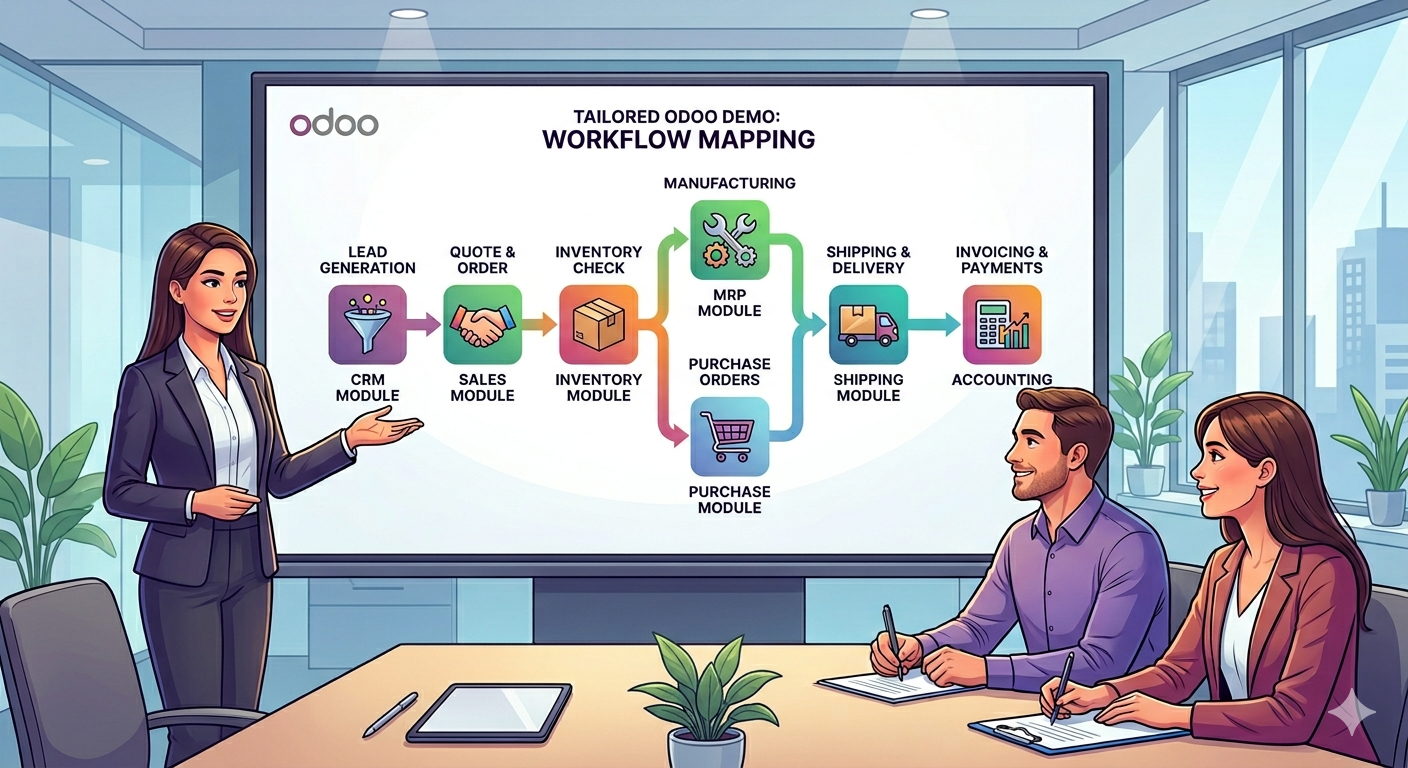
The sales module: order to cash, not click to click
A useful sales demo covers the full order to cash cycle, not just quote creation and order confirmation. Watch how pricing rules, approval workflows, backorders, and credit limit enforcement behave across real scenarios. If the presenter only clicks through the quote screen, you have seen about 20% of what sales actually does.
These are the sales behaviours we probe hardest during Odoo Demos, because they are where vanilla walkthroughs most often hide complexity.
-
→
Pricing rules that reflect your reality Customer specific pricelists, volume breaks, time bound promotions, and contract pricing. Show one rule. Then show what happens when two rules conflict.
-
→
Discount governance and approvals Ask to see a quote with 15% discount routed for manager approval, then a second quote with 30% discount that needs the commercial head. Odoo handles this through Studio or custom rules, so get the answer upfront.
-
→
Backorders and partial shipments Customer orders 100 units. Stock has 60. Show what Odoo does by splitting the delivery, creating a backorder, and updating the invoice. Watch the cross module behaviour.
-
→
Credit limit enforcement Ask for an order to a customer who has breached their credit limit. Should it block the sale, warn the sales rep, or route for approval? Your policy, your demo.
-
→
Multiple currency and tax treatment Show a USD quote to a US customer from an Indian entity. How does the exchange rate lock? How does GST versus zero rated export reflect? Where does the forex gain or loss post?
Purchase and procurement: where vendor realities surface
The purchase demo tells you whether vendor realities such as RFQs, three way matching, landed costs, drop shipment, and subcontracting are standard features, configurations, or custom development. Generic demos skip this because procurement teams ask hard questions. Prepare them.
Most procurement teams care about three things the sales rep will not demo unprompted. The first is three way matching (PO, GRN, invoice quantities and prices matched before payment approval), the second is landed cost allocation (freight, customs, insurance apportioned to inventory value), and the third is reordering rules (minimum stock, lead time, and vendor preference driving automatic RFQs).
Ask the presenter to create a PO for raw material, receive a partial GRN, enter a vendor invoice that does not match either quantity or price, and show the exception flow. If Odoo routes it for resolution without manual intervention, the accounts payable automation is real. If the presenter manually fixes the mismatch on screen, you are seeing a feature that needs custom workflow on top.
💡 Pro tip: If you run drop shipment or subcontracting, demand a dedicated segment. Odoo's drop shipment route is standard, but the accounting treatment (supplier invoice flow, revenue recognition, margin tracking) is where implementations stall. See our deep dive on what counts as configuration versus customization before committing.
Inventory and warehouse: the module that exposes the most gaps
Inventory is where vanilla Odoo Demos collapse. Demand to see multistep routes, putaway and removal strategies, costing methods under landed cost, and lot or serial traceability across locations. This module governs the accuracy of your stock valuation, which flows directly into your P&L.
Odoo's inventory engine is genuinely powerful. It is also deep enough that a superficial Odoo Demo leaves you without a view of what matters. Push on these five areas during the session.
Multistep routes and warehouse topology
A single step receipt (supplier to stock) is trivial. A three step receipt (supplier to input, input to quality, quality to stock) with automatic rules, barcode scanning, and rejection handling is where real warehouses operate. Show both. Ask what happens when QC rejects 15% of a batch, where the rejected stock sits, and how the vendor return is initiated.
Putaway and removal strategies
Putaway rules decide where incoming stock goes (product specific bins, category zones, mixed storage). Removal strategies decide which units ship out first (FIFO, LIFO, FEFO, closest location). These are standard in Odoo Enterprise but need configuration. A demo that skips them is a demo for a business with one warehouse and one SKU.
Costing methods and landed costs
This is the single question that should dictate your demo time on inventory. Different costing methods post different values to your P&L. If you import raw materials with 20% landed cost components, standard costing and average costing give meaningfully different profit numbers across a quarter.
| Costing method | Best for | Watch out for |
|---|---|---|
| Standard | Manufacturing with stable input costs | Variance handling needs finance process |
| Average (AVCO) | Distribution, volatile input costs | Historical revaluation is expensive |
| FIFO | Regulated industries, perishables | Accuracy at the layer level requires discipline |
Ask to see landed cost posted against a specific receipt, watch how it flows to the stock valuation, and check the journal entry. If the presenter cannot show the accounting impact in real time, the integration between inventory and finance is not demo ready.
Lot and serial traceability
If you manufacture regulated products (pharma, food, electronics), lot and serial traceability is not optional. Demand a live trace where you pick a lot and see the upstream view (which raw materials, which supplier, which GRN) and the downstream view (which work orders, which finished goods, which customers) within the same screen. If this takes more than three clicks, your compliance team will push back.

Manufacturing: where MRP meets reality
A manufacturing demo should walk a real multilevel BOM through work orders, routings, quality checks, and scrap, not just show a single level assembly. Ask about make to order, subcontracting, and by products. This is where vanilla demos routinely misrepresent Odoo's depth, in both directions.
Start with the BOM structure. A two level BOM (finished good built from raw materials) is trivial. A four level BOM (finished good built from subassemblies built from components built from raw materials, some of which are subcontracted) is reality. Ask the presenter to build one on screen, including phantom BOMs if you use them. Watch the explosion logic during the MRP run.
Then stress test the work order flow. Capacity planning at work centers, routings with setup and cleanup time, quality checks that gate step transitions, scrap and rework entries that post to the right cost centers. If the presenter skips scrap accounting, they are hiding where MRP accuracy breaks in month two.
- ✓Multilevel BOM explosion during MRP run
- ✓Work center capacity view with conflict detection
- ✓Routings with quality gates at each step
- ✓Subcontracting flow with buyback accounting
- ✓By product handling in yield based industries (textile, chemical, food)
- ✓Scrap entry with cost center posting
Finance and accounting: the module most reps demo badly
If your Odoo Demo skipped period close, tax matrices, analytic accounting, and intercompany transactions, you did not see a finance demo. This is the module sales reps demo worst and the one that governs whether Odoo actually works for your CFO.
"The finance demo is where implementations succeed or die quietly. Everything else can be fixed. Wrong accounting logic compounds for years."
Tatvamasi Labs, across 80+ implementations
Tax engine depth
For Indian implementations, ask to see GST on an intrastate sale, an interstate sale, an export with zero rating, and a reverse charge transaction. Watch the HSN/SAC tagging, the input credit flow, and the GSTR-1 and GSTR-3B report generation. For global implementations, probe VAT matrices, withholding tax (TDS/TCS in India, WHT elsewhere), and tax inclusive versus tax exclusive pricing.
Multiple currency and revaluation
Show a USD receivable booked at one rate and realised at another. Where does the forex gain or loss post? How does month end revaluation work for open items? If you operate across entities, ask about intercompany eliminations covering same currency and cross currency transactions, with automatic reconciliation at the group level.
Analytic accounting
Analytic accounting is how Odoo tracks cost centers, project profitability, branch level margins, and departmental budgets without cluttering your main chart of accounts. It is one of Odoo's strongest features and one that most demos skip. If your business needs project level P&L, branch level EBITDA, or cost center reporting, demand a segment on this.
Period close and audit trail
Ask the presenter to lock a closed period and then attempt to post a backdated entry. What is the workflow? Who approves? Is there an audit log showing every attempt, successful or blocked? Ask for the standard auditor report package covering trial balance, general ledger, aged receivables and payables, and bank reconciliation statement. A finance demo without these is incomplete.
CRM, HR, and the supporting modules
The supporting modules (CRM, HR, Project, Helpdesk, Website) rarely make or break the decision, but watch how they talk to each other. Odoo's real value is in the integration between modules, not in any single one. A CRM that does not hand off cleanly to Sales is a standalone CRM with an Odoo skin.
For CRM, probe the lead to quote conversion, email integration with your domain, and pipeline automation. For HR, the Indian payroll localisation, PF/ESIC/PT compliance, attendance and leave integration, and how expense claims flow to accounting. For Project, timesheets tied to analytic accounts and billing rates that drive automatic invoicing.
If you run an eCommerce business, insist on a live demo of the Website module connected to Inventory and Sales. Stock visible on the storefront should reflect real time warehouse availability, and orders placed online should drop straight into the same sales flow your field team uses. Our write up on third party integration patterns covers what to probe when the website is non Odoo.
Questions you should be asking during the Odoo Demo
Every Odoo Demo should be interrogated with the same four core questions. Ask what is standard, what is configuration, what is custom code, and what breaks on upgrade. These are the questions that predict project cost and long term fit more accurately than any feature comparison.
The full set we use with enterprise buyers is listed below.
-
→
What breaks when we scale from 100 to 10,000 orders per day? Report performance, workflow bottlenecks, API throughput. Demo systems often run on tiny datasets.
-
→
Is this feature standard, configuration, or custom code? Ask after every workflow. The answer dictates implementation cost and upgrade complexity.
-
→
What breaks on the next version upgrade? Odoo releases annually. Custom modules need retesting and often refactoring. Get the honest answer.
-
→
Can you demo integration with [your specific tool]? Payment gateway, shipping partner, marketplace, BI tool, existing HRMS. Live demo beats a connector logo on a slide.
-
→
Who owns the data and where does it live? Odoo.sh, Odoo Online, on premise or self hosted. Each has different backup, compliance, and exit implications.
-
→
How are reports built, and can business users build them? Studio reports, pivot views, Spreadsheets module, external BI connection. Dependency on developers kills reporting velocity.
-
→
Show us a reference client in our industry. Named, reachable, implemented in the last 18 months. Not "we do textile" but "call this CFO at this company."
After the demo: what to evaluate
The written document you receive after the demo matters more than the demo itself. Ask for a fit gap analysis, a scope and timeline document with clear customization line items, and sandbox access loaded with your own data. These three deliverables separate a real implementation partner from a reseller in a suit.
The fit gap document is the single most useful artifact. It lists every workflow you reviewed, tags each one as standard, configuration, or custom, estimates effort for the custom pieces, and flags risks. We send ours within 48 hours. If you wait a week for yours, that is a signal about implementation responsiveness.
- ✓Written fit gap document with Standard / Config / Custom tagging for every workflow
- ✓Scope, timeline, and cost document with customization items itemised separately
- ✓Sandbox access with your chart of accounts and a sample of your master data loaded
- ✓Reference calls with at least two clients in your industry, implemented within 18 months
- ✓Clarity on hosting model, upgrade support, and long term support charges
If the demo surfaced integration complexity, our Odoo integration services page documents the patterns we use for real time and batch integrations. And for a longer conversation about fit before you commit, book a free Odoo consultation with our team.
Book a process led Odoo Demo for your business
45-minute discovery call. Tailored demo. Written fit gap within 48 hours.
Frequently Asked Questions
Prefer a quick chat? WhatsApp our team, we respond within the hour.
💬 Chat on WhatsApp
