



What this post covers is why the Odoo Website module outperforms standalone CMS platforms for businesses running their operations on Odoo.
Written for SME owners and operations heads evaluating whether to move their website onto Odoo · You will come away with a clear picture of what you gain and what you trade off.
Most businesses we talk to run their Odoo Website on WordPress or Wix and then spend real money stitching it to their CRM through Zapier, a third-party form tool, and a separate email marketing platform. It works, until the lead data goes missing at 2 AM, the sync breaks after a plugin update, or someone changes a field name in the CRM and the whole pipeline stops talking to the site. The website was always meant to feed the business. Somewhere along the way, it became a maintenance liability instead.
The uncomfortable truth is that a standalone CMS is not cheaper. It is just cheaper to start. The integration costs, the plugin subscriptions, the developer time to keep everything talking. These costs add up quietly over 12 to 18 months while the value of having everything in one system compounds in the opposite direction.
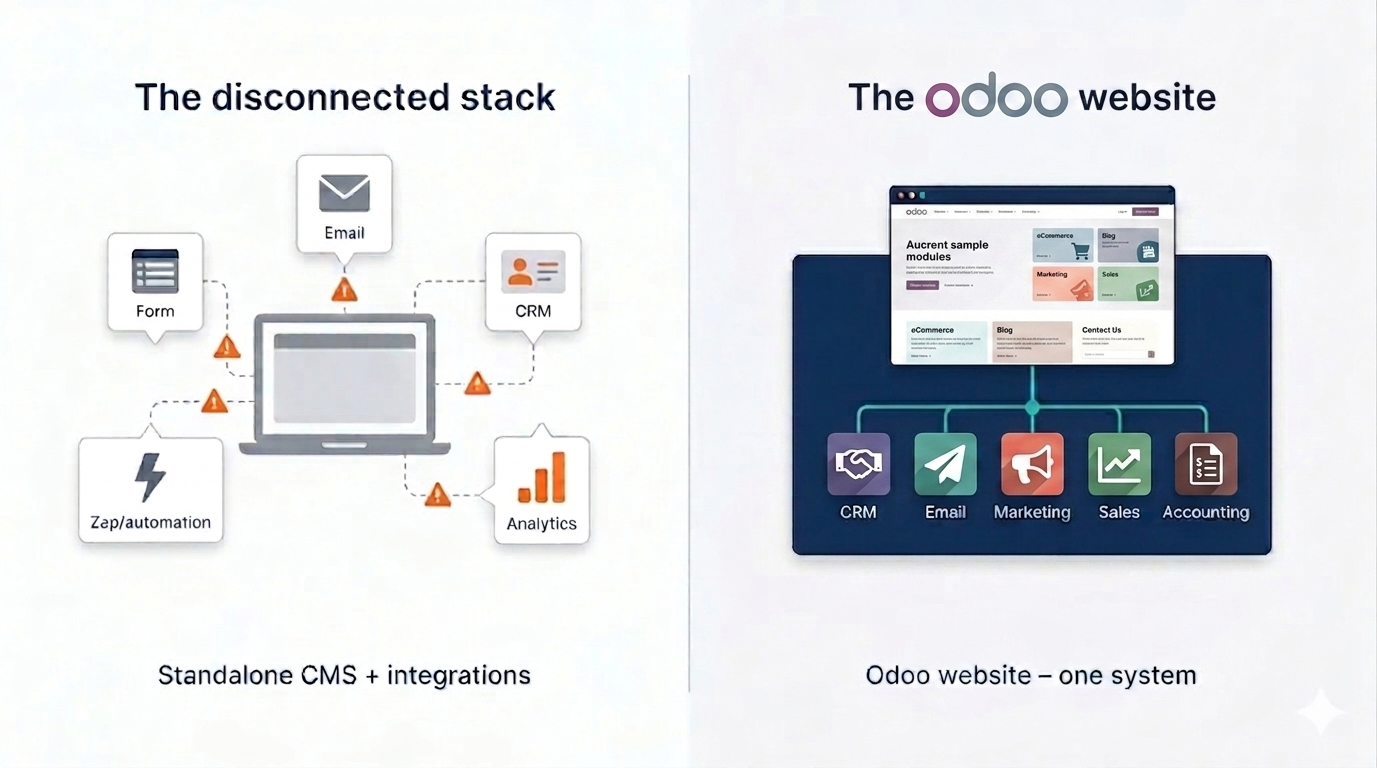
- →The Odoo Website module shares a single database with your CRM, marketing, sales, and accounting with no connectors, no sync delays, and no data loss between systems.
- →Tatvamasi reports that businesses migrating from a WordPress-plus-Zapier stack to Odoo Website typically eliminate 3 to 5 separate SaaS subscriptions, based on our implementation projects over the past three years.
- →WordPress and Wix are better choices for design-first or content-heavy sites with no back-end business systems to connect. For operations-first businesses already on Odoo, they create friction at exactly the point where speed matters most.
- →The right moment to migrate is before you scale, not after you have 40 WordPress plugins to untangle.
What Actually Makes the Odoo Website Different
The Odoo Website module is not a website builder that integrates with your business tools. It is a website that is your business tools. Every form submission becomes a CRM lead. Every page view is tracked in the same analytics database your sales team uses. Every contact who fills out your quote request lands directly in your pipeline with no webhook, no sync job, and no middleware.
This distinction sounds small until you have lived through a broken Zapier zap that silently dropped 200 leads over a long weekend. Standalone CMS platforms are built to publish content. They become business tools through plugins and integrations, each of which is a failure point you are responsible for maintaining. Odoo Website starts from the other end as a business platform that also publishes content.
The drag-and-drop interface is genuinely no-code. Non-technical marketing staff can build and update the site independently. More importantly, what WordPress cannot give you out of the box is end-to-end revenue attribution traced in a single screen, and that is native in Odoo. That is the gap that matters.
- ✓Add pages, update banners, and publish blog posts with no developer needed
- ✓Every contact form creates a CRM lead automatically with no Zapier and no webhook
- ✓Page-level analytics live in the same database as your sales pipeline
- ✓Visitor to customer journey visible as a single record, not a cross-system guess
The Hidden Cost of a Disconnected Website Stack
A typical SME running WordPress alongside Odoo for its back-end operations is quietly paying for more than it realises. Map it out and you will usually find a WordPress hosting subscription, a premium theme licence, three to five plugin licences covering forms, SEO, caching, security, and backup, a Zapier or Make plan to pipe leads into the CRM, and a separate email marketing tool because WordPress does not have one natively. Each of those is a renewal, a version to keep updated, and a potential point of failure.
⚠️ Watch out: Plugin conflicts are the most common source of unexpected WordPress downtime. Every new plugin you add to integrate your site with a business tool increases the surface area for that conflict. After 30 plugins, you are running a maintenance project, not a website.
The cost that rarely makes it into the spreadsheet is developer time. Every time a plugin update breaks the CRM sync or the contact form stops working, someone has to debug it. We have seen businesses spend more on keeping their WordPress-to-Odoo bridge functional than they would have spent on a full Odoo implementation including the website module.
There is also a reporting cost. When your website lives in one system and your sales pipeline in another, attribution becomes a guess. The hidden costs stack up across three key areas.
- →Which page the lead came from, which cannot be tracked without a custom analytics layer
- →Which campaign touched them, buried in a separate email marketing tool
- →Time from first visit to closed deal, which is impossible to answer without a complex multi-tool setup
In Odoo, that entire journey is visible natively. The visitor, the lead, and the customer are the same record. No reconciliation, no export, no spreadsheet.
Odoo Website vs WordPress vs Wix: What Growing Businesses Find Out
Each platform has a genuinely different purpose. WordPress is a content platform that became a business platform through extensions. Wix is a design tool for getting a site live fast. Odoo Website is a business management platform that also runs your website. These are not the same thing, and the differences compound as your business grows.
← Scroll to see all columns →
| Capability | Odoo Website | WordPress | Wix |
|---|---|---|---|
| Native CRM connection | ✓ | Plugin required | ✗ |
| Marketing automation built-in | ✓ | Third-party tool | Basic only |
| Shared lead/customer database | ✓ | ✗ | ✗ |
| Sales pipeline from web leads | ✓ | Via integration | Via integration |
| Accounting visibility | ✓ | ✗ | ✗ |
| Template / design flexibility | Good | Excellent | Very good |
| Plugin / maintenance overhead | Low | High | Low |
| End-to-end revenue attribution | ✓ | ✗ | ✗ |
WordPress wins on design depth and plugin breadth, and those are real advantages for agencies or publishers. Wix wins on speed to launch for simple sites. But neither of them was built to be a business management platform first. When you need your website to participate in your operations, not just sit next to them, those advantages become less relevant than they look in a feature comparison chart.
If your business already uses Odoo for CRM, sales, or financials, adding the Odoo Website module is a configuration exercise. If you are running WordPress in that context, you are managing a bridge. The difference in ongoing effort is not marginal. This is worth considering before your Odoo customisation scope is set.
When Your Website Finally Lives in the Same System as Your Business
The practical change when you move your web presence onto the Odoo Website module is that your website stops being a publishing tool and starts being a business channel. When a visitor fills out a contact form, the record appears in your CRM pipeline immediately, tagged with the page they came from and the campaign that brought them. Your sales team can follow up within minutes, with full context, without anyone copying data from a spreadsheet.
Email marketing campaigns built in Odoo pull their audience from the same contact database your sales team works from. A lead that was nurtured through a drip sequence and then converted to a customer. That journey is one record, not a cross-reference between three systems. The attribution question ("did this campaign contribute to that deal?") has an answer, not an estimate. This is what we mean when we say marketing automation to accounting runs under one roof.
"The website was always meant to feed the business. When it actually does, the whole operation moves faster."
Tatvamasi Labs, from Odoo implementation projects
There is also a scaling argument that rarely gets made explicitly. What works on Zapier at 50 leads per month breaks at 500. The webhook logic that felt simple at launch needs a developer to extend the moment your product catalogue grows or a new form type is added. Scaling a disconnected stack means scaling every connection point. Scaling Odoo means scaling one system. That difference shows up across three key areas.
- ✓Lead volume growth does not break the pipeline with no sync layer to fail
- ✓New modules (accounting, inventory, field service) extend the same data model, and the website already connects to them
- ✓Maintenance overhead stays flat with no extra plugin licences or middleware subscriptions as you grow
💡 Pro tip: If you are evaluating Odoo for the first time, scope the website module into your initial implementation. Adding it after go-live is straightforward, but starting with it means your contact and lead data is clean from day one with no import and no deduplication headache.
What Switching to Odoo Website Actually Looks Like
Most businesses migrating from WordPress to Odoo Website are often surprised by how fast the migration goes and how little they actually needed from WordPress. Content migration (pages, blog posts, images) takes a few days for a typical SME site. The Odoo Website builder recreates standard layouts quickly using its block library. Custom design requirements beyond that need a developer, which is true of WordPress too.
What takes longer is the integration work you get to stop doing. Decommissioning the Zapier flows, removing the form plugins, consolidating the email marketing tool. That is where the real time saving appears. You are not just adding a new website but simplifying your whole stack. The integrations you still need, such as a payment gateway or an external logistics system, connect to Odoo's API layer, not to the website separately.
One area to plan carefully is SEO. Your existing WordPress site has domain history, indexed pages, and potentially well-performing URLs. A migration to Odoo Website should include a redirect map so no ranking page loses its equity. This is standard practice in any CMS migration and Odoo is no different. Done properly, with 301 redirects in place and the Odoo sitemap submitted to Search Console, the transition should not cost you organic traffic. See our guidance on Odoo implementation timelines for how this fits into a broader rollout plan.
-
→
Content audit first Identify which pages actually drive traffic or conversions before migrating. This is the moment to retire outdated pages rather than carrying them forward.
-
→
Redirect map before launch Every URL that has inbound links or search ranking should have a 301 in place on day one. Missing redirects are the main cause of post-migration ranking drops.
-
→
CRM pipeline mapping Define how web forms map to CRM stages before go-live. This is where the integration value crystallises and should be designed, not retrofitted.
-
→
Stack consolidation List every SaaS subscription your website currently touches, including forms, email, analytics, and CRM connectors. Odoo replaces most of them. Plan which to cancel at launch.
If your business is already live on Odoo and your website is the last piece running outside the system, that is the most straightforward case we work on. The data model is already in place. The contacts, companies, and pipeline stages are already defined. Adding the Odoo Website module is, in many cases, a days-long project, not a weeks-long one. A scoping call tells you exactly where your business sits on that spectrum.
Ready to bring your website inside Odoo?
We scope Odoo Website migrations from WordPress, Wix, and custom-built sites and show you exactly what your stack looks like after consolidation.
Frequently Asked Questions
Prefer a quick chat? WhatsApp our team. We respond within the hour.
💬 Chat on WhatsApp
