



This post explains how Odoo Apps share data internally, which module chains create the most value, and what breaks when configuration order is wrong.
Written for business owners and operations leads evaluating Odoo. · By the end, you will have a clear mental model of Odoo's integration architecture so you buy only what you need.
Most companies shopping for Odoo Apps focus on features. They compare module lists, count checkboxes, and pick the apps that sound relevant. What they skip is the question that actually determines whether the system works. How do these apps talk to each other once they're installed?
We've taken over projects where businesses bought eight or nine Odoo Apps, configured them independently, and then discovered that their sales orders weren't triggering inventory movements because one checkbox in a warehouse setting was missed during setup. The apps were all there. The integration logic was not.
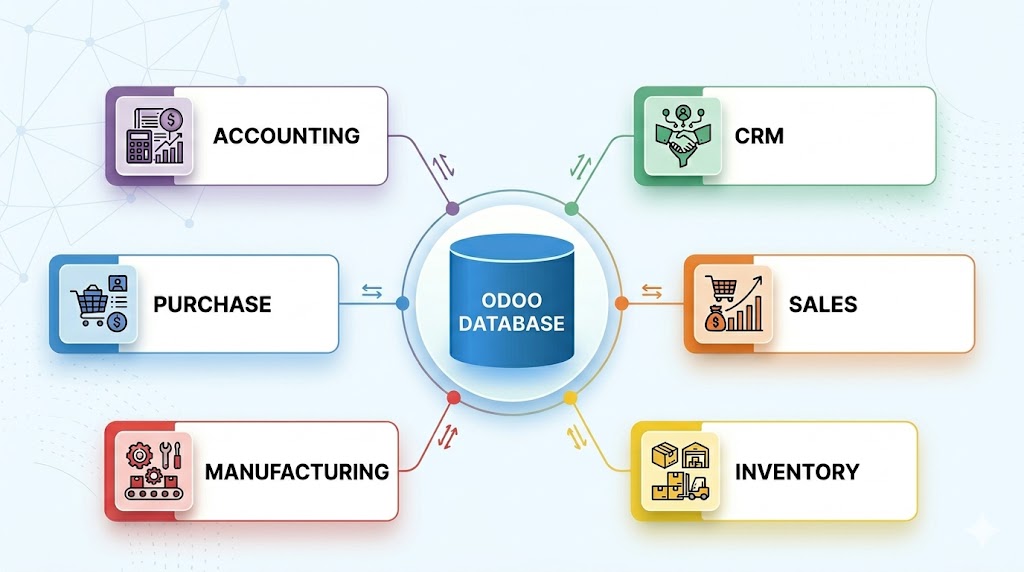
- →Every Odoo app reads and writes to a single PostgreSQL database. There is no syncing, no middleware, no API calls between modules.
- →According to Tatvamasi Labs, across 80+ projects, the most common post-go-live complaint is that apps do not talk to each other. This is almost always a configuration problem, not a software limitation.
- →Configuration order matters. Set up Accounting before Sales and Inventory before Manufacturing. Getting this wrong creates rework that costs weeks.
- →You don't need every Odoo app on day one. Start with the chain that matches your core workflow and expand from there.
Why Odoo Apps Share a Single Database (and Why That Changes Everything)
Every Odoo app writes to the same PostgreSQL database. This is the single most important architectural fact about Odoo, and most buyers never hear it explained clearly. It means a customer you create in CRM is the exact same record your Sales team quotes and your Accounting team invoices.
Compare this to how most mid-market software stacks work. You have a CRM that syncs contacts to an accounting tool via Zapier, an inventory system that exports CSVs into your ERP, and a manufacturing tracker in a spreadsheet. Every connection is a potential failure point, a sync delay, or a data mismatch waiting to surface during an audit.
Odoo Apps don't "integrate" in the traditional sense. They share a single database and codebase. Data created in one app is instantly available in every other app with zero sync, zero APIs, and zero middleware.
← Scroll to see all columns →
| What You're Comparing | Odoo (Single DB) | Traditional Stack |
|---|---|---|
| Customer record | One record, used everywhere | Duplicated across CRM, billing, support |
| Data sync method | Instant (same database write) | API calls, Zapier, scheduled sync |
| Stock after a sale | Updated in same transaction | Webhook delay or manual update |
| Accounting entry | Auto-posted on stock movement | Manual journal or CSV import |
| Maintenance overhead | ✓ Zero | ✗ Ongoing |
Odoo eliminates this entire category of problems. When your warehouse team receives goods against a purchase order, the accounting entry for that receipt is created in the same transaction. Not "synced a few minutes later." Created at the same moment, in the same database write.
The uncomfortable admission is that this architecture is powerful, but it also means a misconfiguration in one app can cascade into others. A wrong tax mapping in Accounting doesn't just produce bad invoices. It produces wrong journal entries, incorrect GST returns, and inventory valuation mismatches. The single database is a strength when configured correctly, and a multiplier of errors when it's not. That's why implementation methodology matters more than feature lists.
How the Core Odoo Apps Actually Talk to Each Other
Odoo Apps communicate through shared data models and automated triggers, not through API calls. When you confirm a sales order, the Sales app doesn't "send" anything to Inventory. Instead, it creates a stock picking record in the same database that the Inventory app reads from. Both apps are looking at the same tables.
Here's what a single confirmed sales order actually triggers across your Odoo Apps, assuming Sales, Inventory, Accounting, and Manufacturing are all installed:
-
01
Sales order confirmed. The order locks pricing and customer terms. A delivery order is automatically created in Inventory.
-
02
Inventory checks stock. If stock is available, it reserves the quantity. If not and reordering rules are set, a purchase order or manufacturing order is triggered.
-
03
Manufacturing kicks in (if applicable). A manufacturing order is created from the Bill of Materials. Raw material consumption is deducted from Inventory.
-
04
Delivery is validated. Stock levels update in real time. Accounting records the stock valuation movement.
-
05
Invoice is generated. The invoice pulls line items, taxes, and payment terms directly from the sales order. Journal entries are posted to the general ledger.
All five steps happen inside the same system, reading the same product records, the same customer data, and the same tax configuration. No export. No import. No reconciliation spreadsheet. This is what "integrated" actually means in Odoo, and it is fundamentally different from connecting two separate tools via an API.
💡 Pro tip: Install Odoo Apps with dependencies enabled. When you install Sales, it automatically installs Invoicing. When you install Manufacturing, it pulls in Inventory. Fighting these dependencies by trying to install apps in isolation is a common mistake that breaks the integration chain.
The Odoo Apps Integration Chains That Matter Most for Indian SMEs
Not all Odoo Apps carry equal weight. For Indian SMEs, three integration chains cover 80% of operational needs. Getting these right during Odoo implementation is more important than adding extra modules.
Procure to Pay + Order to Cash (P2P / O2C)
Purchase, Inventory, Sales, and Accounting form the bread-and-butter workflow for trading and distribution
This is the chain every trading business needs. Purchase orders create goods receipts in Inventory, which updates stock levels that Sales can check before quoting. When the sale is invoiced, Accounting picks up taxes, payment terms, and landed costs automatically. For businesses dealing with GST input credit, this chain ensures that purchase tax entries and sales tax entries live in the same ledger without manual reconciliation.
Make to Order (MTO) Workflow
Sales, Manufacturing, Inventory, and Accounting form the workflow that make-to-order manufacturers cannot get wrong
A confirmed sales order triggers a manufacturing order based on the Bill of Materials. Manufacturing consumes raw materials from Inventory, produces finished goods, and the cost of production flows into Accounting for accurate product costing. According to Tatvamasi Labs, based on recent manufacturing projects, companies that configure this chain correctly during implementation see a 30 to 40% reduction in production tracking effort within the first quarter.
Lead to Cash (L2C) Workflow
CRM, Sales, Invoicing, and Accounting cover the service company workflow that most people overcomplicate
For service businesses, the flow is simpler but the data continuity matters just as much. A lead in CRM converts to an opportunity, which becomes a quotation in Sales, which becomes an invoice. The customer record, communication history, and payment terms carry through the entire lifecycle. Many service companies try to add Inventory and Purchase to this chain when they don't need them, which adds configuration complexity for no operational benefit.
What Breaks When You Configure Odoo Apps in the Wrong Order
Configuration order is the silent project killer. Most failed Odoo projects we've inherited didn't fail because of missing features. They failed because apps were configured out of sequence, creating cascading mismatches that only surface weeks after go-live.
⚠️ Watch out: Configuring Sales before Accounting is the most common mistake. Your sales orders will use default tax rates and journals that may not match your actual chart of accounts, creating reconciliation nightmares at month-end.
Here are the configuration errors we see most often. Every one of these creates hours of rework that could have been avoided with a proper sequence.
-
✗
Sales configured before chart of accounts Default income and expense accounts get auto-assigned. Every product created during this window carries wrong account mappings that have to be corrected individually later.
-
✗
Manufacturing installed without Inventory routes Production orders are created but raw materials aren't consumed from stock because warehouse routes (Make to Order, Replenish on Order) weren't activated. Your inventory counts are wrong from day one.
-
✗
Inventory valuation set to manual instead of automated Stock movements don't create accounting entries. Your balance sheet shows zero inventory value even though the warehouse is full. This is a setting, not a bug, and it needs to be set before any stock movement happens.
The correct sequence, based on how we run implementations at Tatvamasi Labs, follows a strict order where each layer inherits settings from the one before it.
| Step 1: Accounting | Chart of accounts, tax rates, GST config, journals |
| Step 2: Inventory | Warehouses, locations, valuation method, routes |
| Step 3: Purchase + Sales | Vendor terms, pricelists, payment terms, taxes per product |
| Step 4: Manufacturing | Bills of Materials, work centres, routing, MTO rules |
| Step 5: CRM + Website | Pipeline stages, lead scoring, eCommerce catalogue |
This order ensures that every downstream app inherits correct financial and stock settings from the start. If you're evaluating partners, ask them what their configuration sequence is. If they can't answer clearly, that tells you something about their consultation process.
How to Plan Your Odoo Apps Selection Without Over-Buying
You don't need every Odoo app on day one. Odoo's modular architecture is designed to let you start with a focused set and expand as your operations grow. The key question worth asking is which apps form your minimum viable chain.
Start by mapping your current workflow. Identify where money enters your business, what operations transform it, and where the financial record lands. The apps that cover this path are your launch set. Everything else can wait for phase two.
Trading / Distribution
- ✓Sales + Purchase + Inventory + Accounting
- ✓Add CRM in phase two if lead volume justifies it
- ✗Skip Manufacturing unless you process goods initially
Manufacturing
- ✓Sales + Purchase + Inventory + MRP + Accounting
- ✓Add Quality and Maintenance once production stabilises
- ✗Avoid eCommerce until back-office is solid
Services / Consulting
- ✓CRM + Sales + Invoicing + Accounting
- ✓Add Project and Timesheets if you bill hourly
- ✗Skip Inventory and Purchase initially
Here is a useful rule of thumb. If you cannot explain why you need an app in one sentence tied to a daily workflow, you do not need it yet. Odoo's pricing model charges per app per user, so unnecessary modules don't just add complexity. They add recurring cost.
One more thing most vendors won't tell you is that some Odoo Apps install dependency apps automatically. When you install eCommerce, you also get Website and Invoicing. When you install Manufacturing, Inventory comes along. This is by design and it is a good thing, but it means your actual app count is always higher than what you selected. Factor that into your customization planning and licence budget.
"The best Odoo implementation isn't the one with the most apps. It's the one where every installed app is actually used in a daily workflow."
Tatvamasi Labs delivery team
Skip the freelancer risk. Hire from a certified Odoo partner.
Scoped delivery, documented code, post-support included as standard.
Frequently Asked Questions
Prefer a quick chat? WhatsApp our team. We respond within the hour.
💬 Chat on WhatsApp
