



This post covers what Odoo ERP for small business actually looks like across all three phases of planning, implementation, and post go live, based on 80+ delivered projects.
Written for SME owners and operations leads evaluating Odoo or about to start an implementation. You will get a realistic picture of effort, timelines, and the decisions that determine success.
Most small businesses come to Odoo ERP after hitting the same wall of too many disconnected tools, too much manual reconciliation, and a growing sense that the business is running the systems rather than the systems running the business. The decision to implement an ERP is usually easy. The implementation itself is where the real work lives, and where the gap between expectation and reality tends to bite.
We have delivered over 80 Odoo projects since 2019, across textile manufacturing, distribution, solar energy, eCommerce, and field service. The businesses that get the most out of Odoo ERP are rarely the ones with the biggest budgets. They are the ones that plan honestly, scope tightly, and treat go live as the start of adoption, not the end of the project.
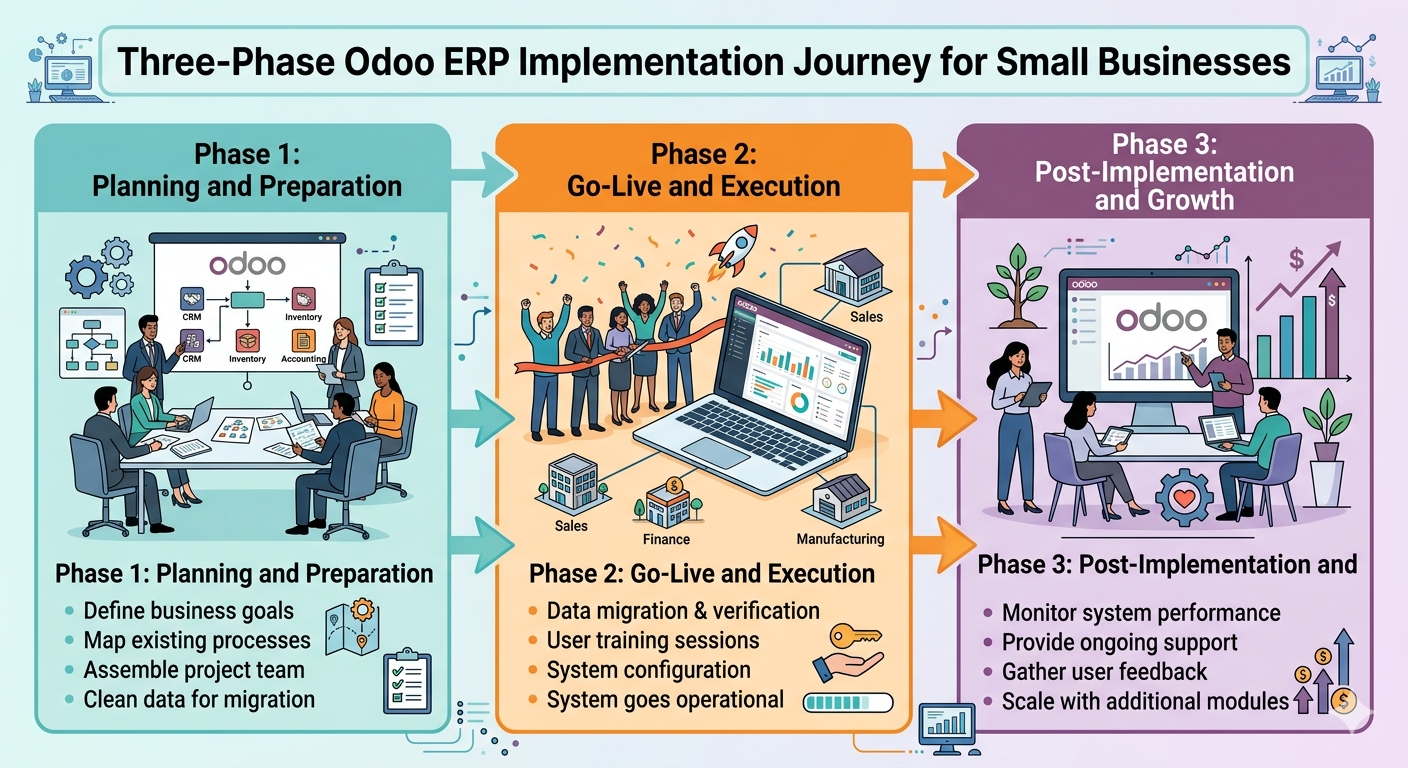
- →Odoo ERP for small business works best when scope is narrow at launch. Start with three to four modules, not ten.
- →According to Tatvamasi, data migration problems account for the majority of implementation delays we see, based on 80+ projects delivered since 2019. Clean your data before the project starts, not during it.
- →Go live is not the finish line. The first 30 to 90 days after launch are where adoption is won or lost, and where most SMEs underinvest.
- →A focused implementation with an experienced partner consistently outperforms a broad independent implementation, even when going it alone is technically cheaper on paper.
Is Odoo ERP the Right Fit for a Small Business?
Odoo ERP for small business is a strong fit when you have outgrown spreadsheets and point solutions and need a single system to manage core operations without the licence cost of SAP or Oracle. The modular structure means you start with what you need and expand as the business grows. You are not buying a platform you will use at 20% capacity for the next five years.
That said, Odoo is not a ready to use tool. It rewards businesses that invest time in understanding their own processes before the implementation begins. The right question is not "is Odoo good?" It is "is our business ready to implement it properly?" Here are a few signals that Odoo ERP for small business is the right fit.
- ✓You are managing operations across three or more disconnected tools (accounting, CRM, inventory, etc.)
- ✓Manual data entry between systems is consuming significant staff time each week
- ✓You need real time visibility across sales, inventory, or financials and currently do not have it
- ✓You are planning to scale headcount or product lines in the next 12 to 24 months
- ✓You want one system for accounting, operations, and customer management rather than a patchwork of SaaS subscriptions
That said, if you are a five person business with simple operations and no immediate growth plan, the implementation investment may not pay back quickly. Odoo shines when there is genuine process complexity to solve. A scoping consultation will tell you within an hour whether the fit is there.
Before You Start: What to Get Right in the Planning Phase
The planning phase is where most small business Odoo implementations are won or lost, before a single module is configured. Businesses that rush through this phase to reach go live faster almost universally spend more time fixing problems than they saved by starting early.
Define your scope ruthlessly
The most dangerous moment in a small business ERP project is when the demo goes well. Odoo's module library is extensive, covering accounting, CRM, inventory, purchase, HR, project management, website, manufacturing, field service, and more. It is very easy to walk out of a demo wanting eight modules and arrive at go live with none of them working well. Scope is a discipline, not a feature list.
The right approach for most SMEs is to identify the three to four functions causing the most operational pain right now and implement those first. A practical starting set for most small businesses includes the following.
- →Accounting, which replaces Tally, QuickBooks, or manual bookkeeping. Usually the top priority module for decision maker visibility.
- →CRM, providing structured pipeline and lead tracking to replace spreadsheets or disconnected inboxes.
- →Inventory or Sales, depending on whether the business is product led or service led. These two rarely need to go in at the same time for an SME.
HR, Purchase, Manufacturing, and others come in phase two, once the team is comfortable. This is not a limitation. It is a strategy. Businesses that go live with a narrow scope and high adoption consistently outperform those that launch wide with low engagement.
Clean your data before the project starts
Data migration is the most underestimated part of any ERP project. We consistently see it as the primary cause of delays, not configuration complexity, not customisation, not user training. The culprit is almost always the source data itself, including duplicate customer records, mismatched product codes, missing opening balances, or invoice histories stored across three different spreadsheets with inconsistent formats.
⚠️ Watch out: Businesses often discover midproject that their existing data is far messier than expected. Every week spent cleaning data after the implementation starts is a week added to your go live date and a week of extra implementation cost. Start the data audit on day one of planning, not after the kickoff call.
Before your implementation partner begins configuration, make sure the following items are ready.
- ✓Customer and vendor master list, deduplicated and with consistent naming and contact fields
- ✓Product or service catalogue with standardised codes, categories, and pricing tiers
- ✓Opening balances for accounts receivable, payable, and inventory as of a defined cutoff date
- ✓Decision on historical data, covering how many years of transaction history will migrate and what stays in the legacy system for reference only
Know the Difference Between Customisation and Configuration Before You Commit
Configuration is adjusting Odoo's built in settings to match your workflows, with no code and no risk to future upgrades. Customisation is writing code to change how Odoo behaves. Both are valid, but customisation adds cost, increases implementation time, and complicates future version upgrades. Many small businesses request customisations in the planning phase that they later discover are unnecessary once they understand how Odoo works natively. Our rule is simple. Exhaust configuration before considering any customisation. See our breakdown of Odoo customisation vs configuration to understand where that line sits.
Not sure which modules your business actually needs?
We scope Odoo ERP for small business in a single call, with no fluff, just module fit and a realistic timeline.
During Implementation: What Actually Happens (and Where Things Go Wrong)
A well run Odoo ERP implementation for a small business follows a consistent sequence. Understanding each phase and what can derail it is the difference between an 8 week go live and a 6 month one.
-
01
Discovery and requirements mapping. Your implementation partner maps your current workflows to Odoo's module structure. Every gap between what Odoo does by default and what you need becomes either a configuration task or a decision point. This phase takes one to two weeks for most small businesses.
-
02
Configuration and data migration. The system is built to your spec. Data is cleaned, formatted, and loaded. This is the longest phase, typically three to six weeks, and the one most sensitive to scope changes. Every new requirement added here shifts the go live date.
-
03
User acceptance testing (UAT). Real staff run real scenarios through the system before go live. This is the most underfunded phase in small business ERP projects. Skipping thorough UAT means discovering problems in production, which is far more expensive than discovering them in testing.
-
04
Training. Role based training, not a single all hands session, but separate sessions for finance, sales, warehouse, and operations staff. Each group sees only what they need to use. Generic training produces generic adoption.
-
05
Go live. The cutover from old systems to Odoo. For small businesses, this is usually a hard cutover on a defined date rather than a parallel run. Plan it for a low volume period (start of month, after peak season) where possible.
Where small business implementations most commonly stall
Things nobody tells you in the sales process
-
✗
Scope creep midproject. The team starts using the system in UAT and immediately wants to add features. Every addition at this stage costs two to three times what it would have cost in the planning phase. Enforce a change control process and move new requirements into phase two.
-
✗
Key person unavailability. Small businesses often have one person who understands each department's processes. If that person is unavailable during UAT or training because the business is busy, the project stalls. Protect the implementation schedule like a client delivery.
-
✗
Overcustomisation before understanding defaults. We regularly see businesses request custom development for features that exist in Odoo natively. They just did not know where to look. Always run a full UAT on standard Odoo before raising a customisation request.
For a deeper look at these failure patterns and how to avoid them, our post on Odoo implementation failures covers the seven mistakes we see most often across SME projects.
Go Live Is Not the Finish Line
The first 30 to 90 days after go live are the highest risk period in any small business ERP project. The system is live, the old tools are switched off, and the team is operating in a new environment for the first time under real business pressure. This is when real world edge cases surface, including scenarios that did not appear in UAT, workflows that are slightly off, and users who revert to old habits because the new system feels unfamiliar.
This window is called hypercare, and it is the part of an Odoo ERP implementation that most small businesses do not budget for. Here is what good hypercare looks like in practice.
- ✓Implementation partner available for same day response during the first two to four weeks
- ✓A named internal champion who owns the system and fields user questions before they escalate
- ✓Weekly check in calls between business and partner to surface issues early
- ✓A structured 30 to 90 day review to assess adoption, identify gaps, and plan the next phase
What the 30 to 90 day review should cover
Do not wait until a problem is obvious before reviewing system performance. A structured review at each milestone keeps the implementation value compounding rather than drifting.
Day 30
- ✓Is the team using the system daily?
- ✓Are any old tools still running in parallel?
- ✓Data entry errors and workarounds
Day 60
- ✓Which features are underused?
- ✓Reporting and dashboards set up?
- ✓Targeted retraining for struggling users
Day 90
- ✓Phase two module planning
- ✓ROI visible from phase one?
- ✓Integration or automation candidates
If you are not doing a structured review at 90 days, you are probably leaving adoption value on the table. Our Odoo ERP support audit is designed exactly for this moment, for businesses that went live but want to know whether they are using the system to its potential.
What Small Businesses Get Wrong About Odoo ERP
After 80+ implementations, the mistakes we see are remarkably consistent. They are not technical failures. They are expectation failures, gaps between what a business assumed Odoo would do automatically and what it actually requires from the business itself.
-
✗
Treating Odoo as a ready to use solution. Odoo has sensible defaults, but it does not know your business. Configuration takes time and requires input from the people who understand your processes. Expect to spend two to four hours per week from at least one internal person during the implementation phase.
-
✗
Choosing a partner on price alone. The cheapest implementation quote is often the most expensive outcome. A poorly resourced partner will underscope the project, cut corners on UAT, and hand over a system that the business cannot maintain independently. Evaluate partner track record and delivery experience, not just day rate.
-
✗
Neglecting user adoption as a project deliverable. Technology adoption is a behaviour change problem, not a software problem. A perfectly configured Odoo system that the team avoids using delivers zero ROI. Training, internal communication, and executive buy in are not soft considerations. They determine whether the project pays for itself.
-
✗
Assuming the ERP solves broken processes automatically. If your purchase approval process is chaotic before Odoo, it will be chaotic in Odoo unless you redesign it first. ERP systems digitise and accelerate your processes. They do not fix them. Use the implementation as the forcing function to standardise workflows before they are built into the system.
💡 Pro tip: Before signing with any Odoo implementation partner, ask them what their involvement looks like in the 90 days after go live. If the answer is vague or nonexistent, that partner is optimised for go live, not for your success. The two are not the same thing.
The businesses that get the most out of Odoo ERP are those that treat the implementation as an ongoing business improvement programme, not a one time IT project. Version upgrades, new module additions, and workflow refinements keep the system aligned with a growing business. If you are thinking about what comes after your initial implementation, our guide on Odoo version upgrades covers how to keep the platform current without disrupting operations.
Ready to implement Odoo ERP the right way?
We have delivered 80+ Odoo projects for SMEs across India, the Middle East, and Europe. Tell us what you need to fix and we will tell you exactly what it takes.
Frequently Asked Questions
Prefer a quick chat? WhatsApp our team and we will respond within the hour.
💬 Chat on WhatsApp
